---
title: Check your devices are online
description: Once a week, take two minutes to confirm that every device is online, charged and connected.
image: https://support.sitehive.com/hs-fs/hubfs/Knowledge%20Base%20Import/homepageimages/enviro-setup.jpg?width=1200&name=enviro-setup.jpg
---
[Skip to content](https://support.sitehive.com/en-au/check-your-devices-are-online#main-content)
[](https://support.sitehive.com/?hsLang=en-au)
Open main navigation
Close main navigation
- [Contact us](https://support.sitehive.com/en-au/contact-us)
[Contact us](https://support.sitehive.com/en-au/contact-us?hsLang=en-au)
How can we help?
- There are no suggestions because the search field is empty.
1. [SiteHive Support](https://support.sitehive.com/en-au?hsLang=en-au)
2. [Looking after SiteHive Hexanode devices](https://support.sitehive.com/en-au/looking-after-sitehive-hexanode-devices?hsLang=en-au)
# Check your devices are online
Once a week, take two minutes to confirm that every device is online, charged and connected. Most problems show up here first, well before a gap appears in a report.
### First glance: the map, then the side panel
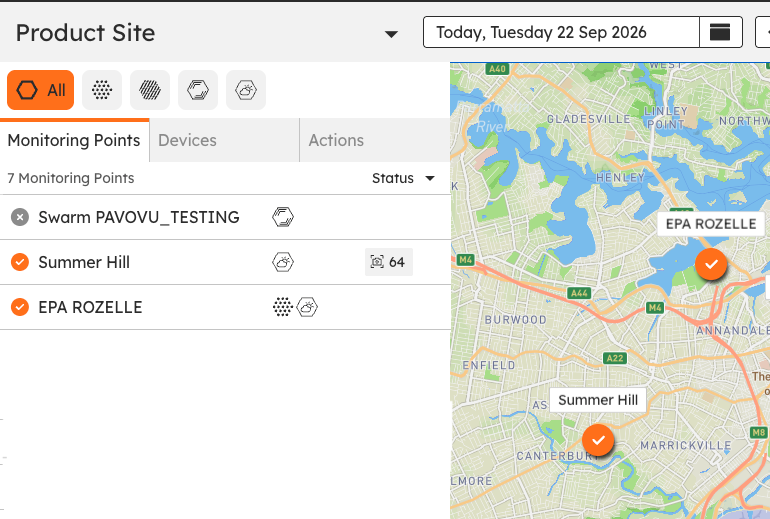
Open the **Dashboard** in **SiteHive Enviro** and choose **All** in the aspect filter. The map shows the status of every [Monitoring Point](https://support.sitehive.com/en-au/what-is-a-monitoring-point?hsLang=en-au), so anything not reporting stands out straight away.
The side panel lists your Monitoring Points and devices with a status symbol beside each:
- **Orange tick:** every device at that Monitoring Point is online.
- **Grey cross:** offline.
- **Half orange, half grey:** some of the devices there are offline.
### Check power and signal
For any device that looks off, read its battery and signal:
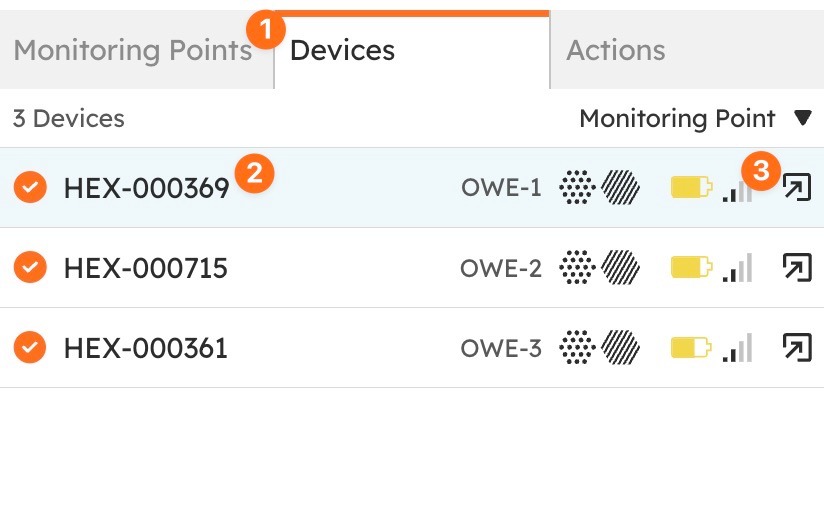
1. Switch to the **Devices** tab in the side panel.
2. Find the device. Its line shows a battery icon and a signal icon.
3. Click the battery icon or the signal icon. The Manage window opens on that device's **Power** or **Signal** tab.
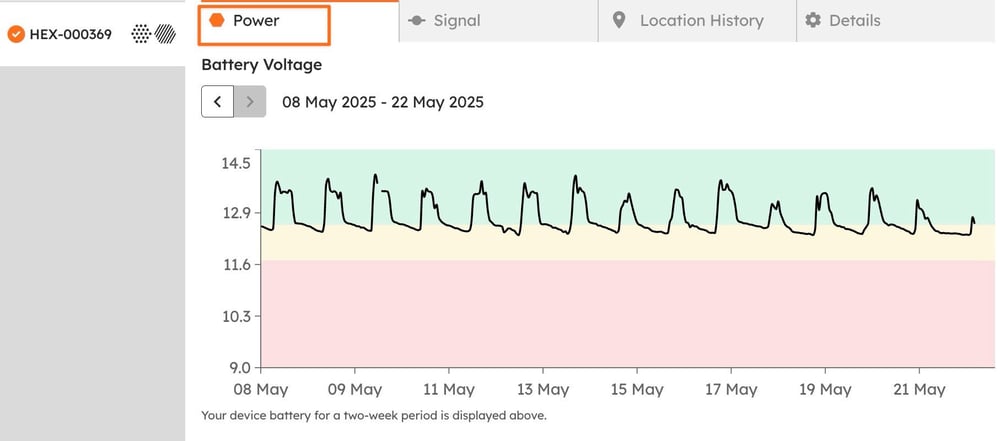
**Power** shows the battery voltage over the last two weeks against green, amber and red bands. On solar, a healthy trace climbs every day while the sun is up and settles overnight, and the overnight lows sit at the same level from one day to the next.
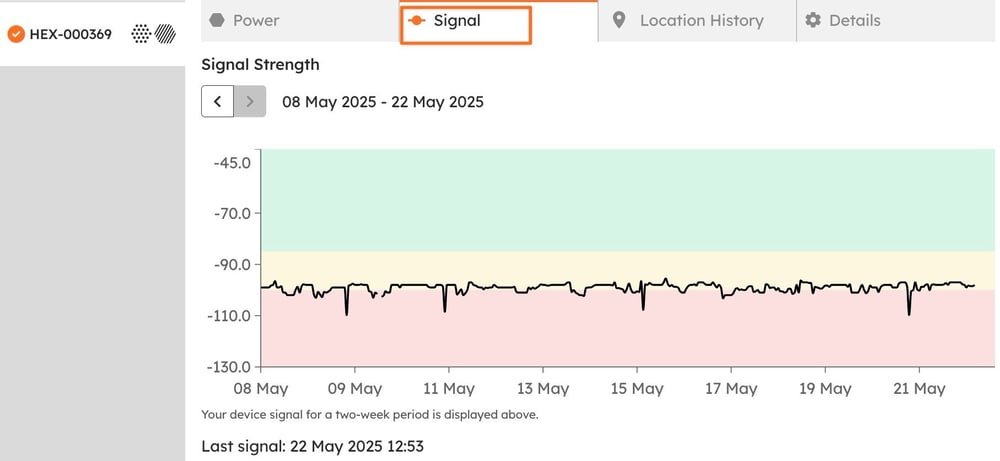
**Signal** shows signal strength over the same two weeks, with the time of the last signal underneath. A steady line is what you want, even a low one; data arriving every reporting period matters more than the number.
The rest of the Manage window is mapped in [Click Manage to adjust settings and devices](https://support.sitehive.com/en-au/click-manage-to-adjust-settings-and-devices?hsLang=en-au).
### What healthy looks like
- Battery above 25% and recovering each day on solar. A level that falls a little every day is the early warning of a shaded or dirty panel.
- Signal steady, with data arriving every reporting period.
- Status shown as online on the map, with the latest values at the Monitoring Point.
### Let the alerts watch for you
Turn on the two device alerts in **Settings \> Rules & Notifications \> Notifications**:
- **Offline device alert:** sent at 8 am if a device went offline and did not recover.
- **Low battery alert:** sent at 8 am if a battery dropped below 25%.
How to set them up is in [Set up rules and notifications](https://support.sitehive.com/en-au/set-up-rules-and-notifications?hsLang=en-au).
### When to act
- **Everything online, batteries healthy:** move on to [Sense check your data](https://support.sitehive.com/en-au/sense-check-your-data?hsLang=en-au).
- **A device is offline:**[If a device goes offline](https://support.sitehive.com/en-au/if-a-device-goes-offline?hsLang=en-au).
- **Battery low or trending down:** the power checks in If a device goes offline.
- **Online, but data missing:** email [support@sitehive.com](mailto:support@sitehive.com).
---
### What's next
[Maintaining your site](https://support.sitehive.com/en-au/maintaining-your-site?hsLang=en-au) (the weekly routine this check belongs to)
[Click Manage to adjust settings and devices](https://support.sitehive.com/en-au/click-manage-to-adjust-settings-and-devices?hsLang=en-au) (the Power and Signal tabs, and the rest of the window)
[](https://sitehive.com/)
[www.sitehive.com](https://www.sitehive.com)
[mailto:support@sitehive.co](mailto:support@sitehive.co)
Copyright © 2026, SiteHive