---
title: Direction of arrival
description: Direction of Arrival (DoA) shows you where noise, dust or wind is coming from, directly on your dashboard map.
---
[Skip to content](https://support.sitehive.com/en-au/direction-of-arrival#main-content)
[](https://support.sitehive.com/?hsLang=en-au)
Open main navigation
Close main navigation
- [Contact us](mailto:support@sitehive.co)
[Contact us](mailto:support@sitehive.co)
How can we help?
- There are no suggestions because the search field is empty.
1. [SiteHive Support](https://support.sitehive.com/en-au?hsLang=en-au)
2. [SiteHive Enviro: dashboard, reports & analysis](https://support.sitehive.com/en-au/sitehive-enviro-dashboard-reports-analysis?hsLang=en-au)
# Direction of arrival
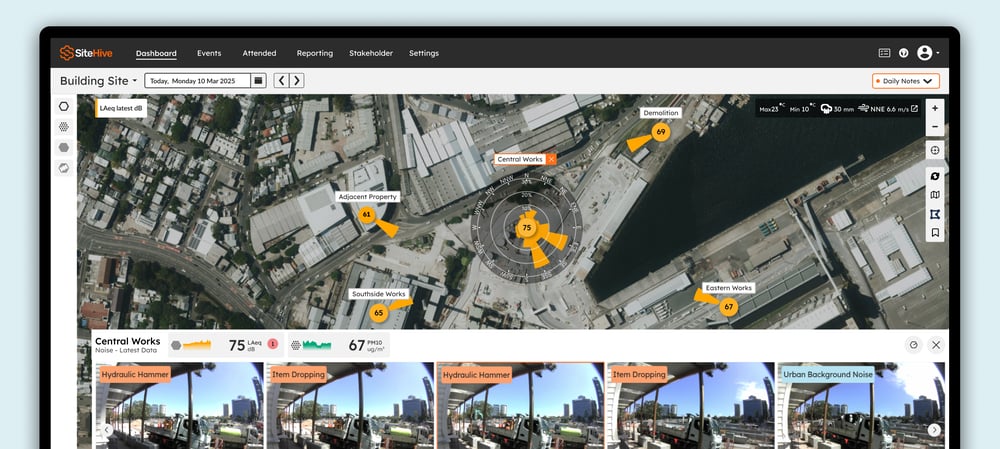
**Direction of Arrival (DoA)** shows you where noise, dust or wind is coming from, directly on your dashboard map.
---
## What is Direction of Arrival?
Direction of Arrival (DoA) is your tool for pinpointing where noise, dust or wind is coming from, based on the Hexanode's orientation and directional data collection.
- **Map indicators:** The map displays the primary direction of activity for noise and dust.
- **Detailed visualisations:** When you click a Monitoring Point, a more detailed **DoA visualisation** appears, giving you granular insights into the source of activity.
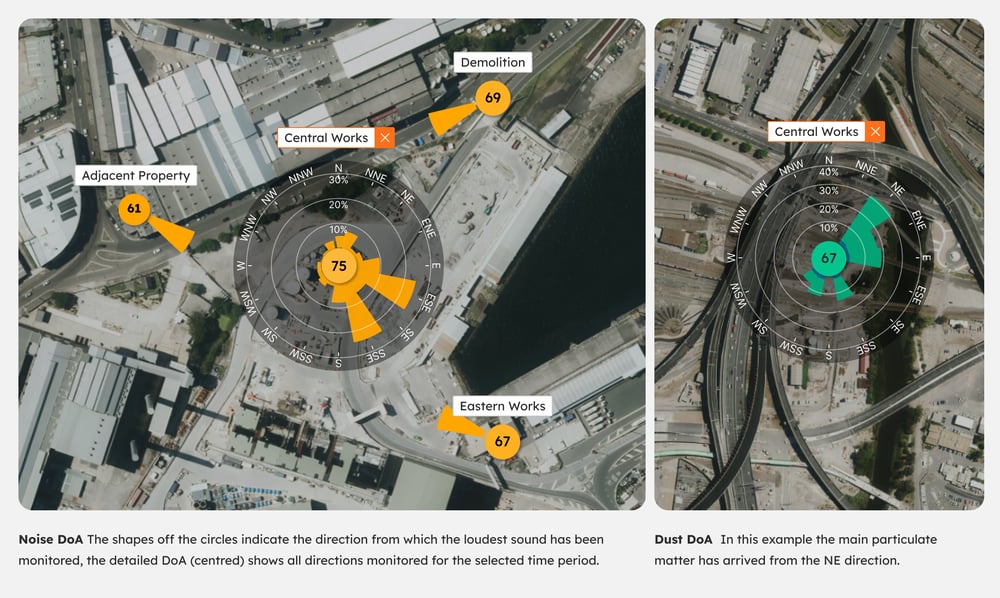
DoA for noise is measured directly by the microphones in the SiteHive Hexanode device. DoA for dust is calculated by matching dust readings over time with the wind direction from the chosen weather source.
---
## Ensuring accurate DoA data
For noise, the Hexanode device's physical orientation directly affects the accuracy of DoA data for noise and weather. To maintain precise measurements:
1. **Install the device correctly:** Follow the [orientation guide](https://support.sitehive.com/en-au/check-and-adjust-your-devices-orientation?hsLang=en-au) for your site setup.
2. **Check the device orientation** during maintenance or redeployment.
---
## Tips for DoA & maps
- Use the **DoA visualisation** to quickly identify trends and hotspots for noise or dust.
- For noise, isolate whether sound is coming from within your site or is external to the site.
- For dust, see the general direction particulate matter is arriving from, and determine potential sources based on activities.
- Switch between aspects to compare activity across Monitoring Points in real time.
---
## What's next
[Check and adjust your device's orientation](https://support.sitehive.com/en-au/check-and-adjust-your-devices-orientation?hsLang=en-au) (the orientation DoA depends on)
[SiteHive Noise: what it measures and how](https://support.sitehive.com/en-au/sitehive-noise-what-it-measures-and-how?hsLang=en-au) (the microphone array behind noise DoA)
[SiteHive Dust: what it measures and how](https://support.sitehive.com/en-au/sitehive-dust-what-it-measures-and-how?hsLang=en-au) (wind direction behind dust DoA)
[](https://sitehive.com/)
More Information Goes Here
[mailto:support@sitehive.co](mailto:support@sitehive.co)
Copyright © 2026, SiteHive