---
title: "SiteHive Vibration: what it measures and how"
description: The SiteHive Hexanode Vibration device measures ground vibration continuously on three axes and turns it into the numbers your project is assessed…
image: https://support.sitehive.com/hs-fs/hubfs/Knowledge%20Base%20Import/homepageimages/enviro-setup.jpg?width=1200&name=enviro-setup.jpg
---
[Skip to content](https://support.sitehive.com/en-au/sitehive-vibration-what-it-measures-and-how#main-content)
[](https://support.sitehive.com/?hsLang=en-au)
Open main navigation
Close main navigation
- [Contact us](mailto:support@sitehive.co)
[Contact us](mailto:support@sitehive.co)
How can we help?
- There are no suggestions because the search field is empty.
1. [SiteHive Support](https://support.sitehive.com/en-au?hsLang=en-au)
2. [Managing environmental aspects](https://support.sitehive.com/en-au/managing-environmental-aspects?hsLang=en-au)
# SiteHive Vibration: what it measures and how
The **SiteHive Hexanode Vibration** measures ground vibration continuously on three axes and turns it into the numbers your project is assessed against. That includes structural impact, human comfort, sensitive equipment and the ground-borne noise people hear indoors.
When vibration spikes, it captures the waveform, so you can see what happened and not just that something did.
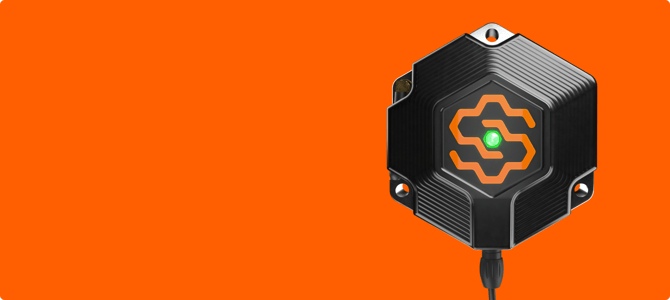
At a glance, the device gives you:
- **PPV and vSum:** structural impact, on every site.
- **VDV:** human comfort, turned on for each Monitoring Point.
- **RMS velocity in one-third octave bands:** sensitive equipment, against VC curves (Enviro Pro).
- **Ground-borne noise:** an estimate of what people hear indoors (Enviro Pro).
- **Waveforms:** captured when vibration spikes, and labelled construction or non-construction (Enviro Pro).
### Structural impact: PPV
**Peak particle velocity (PPV)** is the headline number for damage risk to structures. The device reports the peak on each axis (X, Y and Z) and **vSum**, the combined velocity.
You'll find PPV on the Dashboard and in graphs. The **PPV** tab in [Stats and analysis](https://support.sitehive.com/en-au/stats-and-analysis?hsLang=en-au) shows the daily maximum on each axis for any date range, and its table exports vSum alongside the three peaks.
Each PPV exceedance also records the **frequency at peak velocity**. That's what decides which criterion applies under standards such as DIN 4150-3, and it's what [Smart Select](https://support.sitehive.com/en-au/select-events-in-bulk-with-smart-select?hsLang=en-au) uses for frequency assessment.
### Human comfort: VDV
**Vibration dose value (VDV)** measures cumulative exposure rather than a single peak, which is what human comfort assessments are based on. It's reported on each axis, and day and night are assessed separately, so an evening of piling and a quiet night don't average each other away.
The **VDV** tab in Stats and analysis shows the maximum values for your selected period.
> ℹ️ VDV is turned on for each Monitoring Point. In the **Setup** tab, toggle on **Vibration VDV**. See [Click Manage to adjust settings and devices](https://support.sitehive.com/en-au/click-manage-to-adjust-settings-and-devices?hsLang=en-au).
### Sensitive equipment: VC curves (Enviro Pro)
Near hospital theatres, research labs or precision manufacturing, the criterion is usually a **Vibration Criterion (VC) curve** rather than a single limit. The device measures **RMS velocity in one-third octave bands from 1 Hz to 100 Hz** and plots it against the curve you select.
- **VC-A:** 50 µm/s
- **VC-B:** 25 µm/s
- **VC-C:** 12.5 µm/s
Your project specification or environmental management plan will say which applies. To turn VC curves on, toggle on **Vibration RMS (Sensitive Equipment / VC Curves)** in the Monitoring Point's **Setup** tab. See [Vibration Criterion (VC) curves](https://support.sitehive.com/en-au/vibration-criterion-vc-curves?hsLang=en-au) for alerts, the VC curve chart and CSV export of the band data.
### Ground-Borne Noise (Enviro Pro)
Vibration travelling into a building can be heard indoors as a low rumble, even though it never travelled through the air. The device A-weights its vibration data, and SiteHive Enviro converts it to an estimated **ground-borne noise** level in **dB LAeq**. That lets you monitor what people hear inside from outside, without entering their homes.
The method is based on the **Kurzweil method**, built around the NSW Interim Construction Noise Guideline (2009), and validated on Sydney Metro West.
To turn it on, toggle on **Vibration Ground-borne Noise** in the Monitoring Point's **Setup** tab and enter the scaling factor for that location. See [Ground-borne noise](https://support.sitehive.com/en-au/ground-borne-noise?hsLang=en-au).
### Knowing what caused it: waveforms
When vibration goes above your **vibration media trigger** level, the device captures a **3-second waveform** on each axis. You can open any waveform from its event to see the X, Y and Z traces. See [Set up media triggers](https://support.sitehive.com/en-au/set-up-media-triggers?hsLang=en-au).
On **SiteHive Enviro Pro**:
- **Waveform classification:** every waveform is labelled by AI as **Construction** (🟠) or **Non-construction** (🔵), such as a knock on the device. See [Waveform classification: what caused the vibration](https://support.sitehive.com/en-au/vibration-classifier-what-caused-the-vibration?hsLang=en-au).
- **Smart Select:** explain events in bulk, either by their waveform classification label or by frequency assessment against a standard such as DIN 4150-3, so you only review what's left. See [Select events in bulk with Smart Select](https://support.sitehive.com/en-au/select-events-in-bulk-with-smart-select?hsLang=en-au).
Each exceedance is logged on the **Events** page with its timestamp, peak level and waveform, ready to investigate and explain. See [Events: investigate an exceedance](https://support.sitehive.com/en-au/events-investigate-an-exceedance?hsLang=en-au).
### Alerts, graphs and reporting
- **Alerts:** set thresholds for each [Monitoring Point](https://support.sitehive.com/en-au/what-is-a-monitoring-point?hsLang=en-au) and get an email or SMS when one is exceeded. See [Set up rules and notifications](https://support.sitehive.com/en-au/set-up-rules-and-notifications?hsLang=en-au).
- **Graphs:** plot vSum and the X, Y and Z peaks over any date range. See [Graph your data](https://support.sitehive.com/en-au/graph-your-data?hsLang=en-au).
- **Tables and export:** download aggregated PPV and VDV tables as CSV, plus event-level exports. See [Export a CSV report](https://support.sitehive.com/en-au/export-a-csv-report?hsLang=en-au).
---
### Calibration
Every Hexanode Vibration is calibrated by SiteHive as standard. Where your project requires traceable accuracy, devices are also available with **NATA-accredited calibration** to **ISO 16063-21:2003**. Every deployment carries its calibration record and certificate. See [Calibration and certificates](https://support.sitehive.com/en-au/calibration-and-certificates?hsLang=en-au).
---
### What's next
[Install your SiteHive Hexanode Vibration](https://support.sitehive.com/en-au/install-your-sitehive-hexanode-vibration?hsLang=en-au) (the field procedure for deploying it on site)
[Vibration Criterion (VC) curves](https://support.sitehive.com/en-au/vibration-criterion-vc-curves?hsLang=en-au) (monitoring against VC-A, VC-B or VC-C)
[Ground-borne noise](https://support.sitehive.com/en-au/ground-borne-noise?hsLang=en-au) (measuring what people hear indoors, from outside)
[](https://sitehive.com/)
[www.sitehive.com](https://www.sitehive.com)
[mailto:support@sitehive.co](mailto:support@sitehive.co)
Copyright © 2026, SiteHive