---
title: "Lead-acid power accessories: check, reset and recharge"
description: A solar set-up runs the panel and the battery through a solar controller, the small box with three indicator lights and a small display.
image: https://support.sitehive.com/hs-fs/hubfs/Knowledge%20Base%20Import/homepageimages/enviro-setup.jpg?width=1200&name=enviro-setup.jpg
---
[Skip to content](https://support.sitehive.com/en-au/solar-controller-check-it-is-charging-and-reset-it#main-content)
[](https://support.sitehive.com/?hsLang=en-au)
Open main navigation
Close main navigation
- [Contact us](https://support.sitehive.com/en-au/contact-us)
[Contact us](https://support.sitehive.com/en-au/contact-us?hsLang=en-au)
How can we help?
- There are no suggestions because the search field is empty.
1. [SiteHive Support](https://support.sitehive.com/en-au?hsLang=en-au)
2. [Looking after SiteHive Hexanode devices](https://support.sitehive.com/en-au/looking-after-sitehive-hexanode-devices?hsLang=en-au)
# Lead-acid power accessories: check, reset and recharge
A lead-acid solar setup has three parts to look after: the **solar controller**, the **battery**, and, when the battery runs low, a **backup charger**. This page covers all three, from reading the controller lights through to knowing when a battery is due for replacement.
### Solar controller
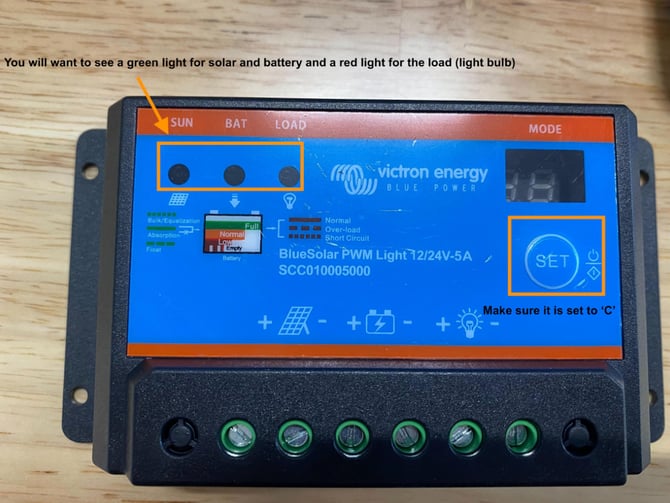
#### What each light means
- **Sun, green:** the panel is receiving sunlight and charging.
- **Bat, green:** the battery is charged.
- **Load, red:** the device is drawing power and recording. This one is normal.
- **Bat, red:** the battery is low. It needs more sun, or a replacement.
#### A red Bat light
A red Bat light almost always means the panel is not doing its job. Check it in this order:
1. **Is it facing north, at the right angle?** Stands get knocked; tilt it to catch the winter sun.
2. **Is anything in front of it?** Grass, weeds, a stockpile, a new shed or a container throw shade that was not there at install.
3. **Is it clean?** Wipe off dust, mud and bird droppings.
4. **Are the cables seated?** Panel into the controller, battery cable at both ends, load cable into the device.
If the panel is clear and the light stays red for more than a day of sun, the battery may no longer hold charge. Lead-acid batteries typically last around two years; email [support@sitehive.com](mailto:support@sitehive.com) and we will organise a replacement or a backup charger.
#### Reset the controller
Press **Set** until **C** is shown on the display, and keep pressing until it is. This puts the controller back in the mode the Hexanode needs.
> ℹ️ The controller lights tell you about the panel and the battery. The light on the device itself tells you whether it is powered, connected and recording: [LED device lights: what each colour means](https://support.sitehive.com/en-au/led-device-lights-what-each-colour-means?hsLang=en-au).
### Recharge a lead-acid battery with a backup charger
A backup charger gets a flat battery back to full in the office or on site. Don’t have one? Email support and we’ll organise one.
1. **Set the charger to Normal (14.4 V).** This matches the battery’s rated charging voltage. Leave it on Normal even for overnight charges.
2. **Check Recondition mode is off.**
3. **Give the battery some air.** Charge it out of the battery box, or with the foam pulled back, so it can shed heat while it charges.
> 💡 Using your own battery or charger? Check the battery’s datasheet for its maximum charging voltage and choose the gentler setting. A gentler charge also extends battery life.
### When to replace the battery
Lead-acid batteries typically last around two years. If a battery won’t hold charge after a full recharge, or it feels hot, looks swollen or smells of acid, stop using it. Leave it upright somewhere ventilated and email support. We'll organise a replacement.
> ℹ️ The controller lights tell you about the panel and the battery. The light on the device itself tells you whether it’s powered, connected and recording: [LED device lights: what each colour means.](https://support.sitehive.com/en-au/led-device-lights-what-each-colour-means?hsLang=en-au)
---
### What's next
[Power and battery options](https://support.sitehive.com/en-au/power-and-battery-options?hsLang=en-au) (choosing mains or solar, lithium or lead-acid)
[If a device goes offline](https://support.sitehive.com/en-au/if-a-device-goes-offline?hsLang=en-au) (the flat-battery checklist, and what to do when the device itself is the fault)
[Install your SiteHive Hexanode Noise, Dust or Noise+Dust](https://support.sitehive.com/en-au/install-your-sitehive-hexanode-noise-dust-or-noise-dust?hsLang=en-au) (building the solar stand)
[](https://sitehive.com/)
[www.sitehive.com](https://www.sitehive.com)
[mailto:support@sitehive.co](mailto:support@sitehive.co)
Copyright © 2026, SiteHive