
The media timeline on your Dashboard shows the photos and audio your SiteHive Hexanode devices capture. Media is recorded at the most significant moment in every 15-minute window, so your timeline is always populated with the content that best reflects what was happening on site. Every Hexanode device type captures media, whether it monitors noise, dust or weather.
How it works
Every 15 minutes, your device identifies the highest measured level for that period and captures media tied to that moment. There is nothing to configure: capture is on automatically for all Hexanode devices. You can also capture extra media whenever a chosen LAmax level is exceeded: see Set up media triggers.
What is captured depends on the device type:
Noise
Triggered by the highest dB (LAmax) in the period. Captures one directional image and one 6-second audio clip.
Dust
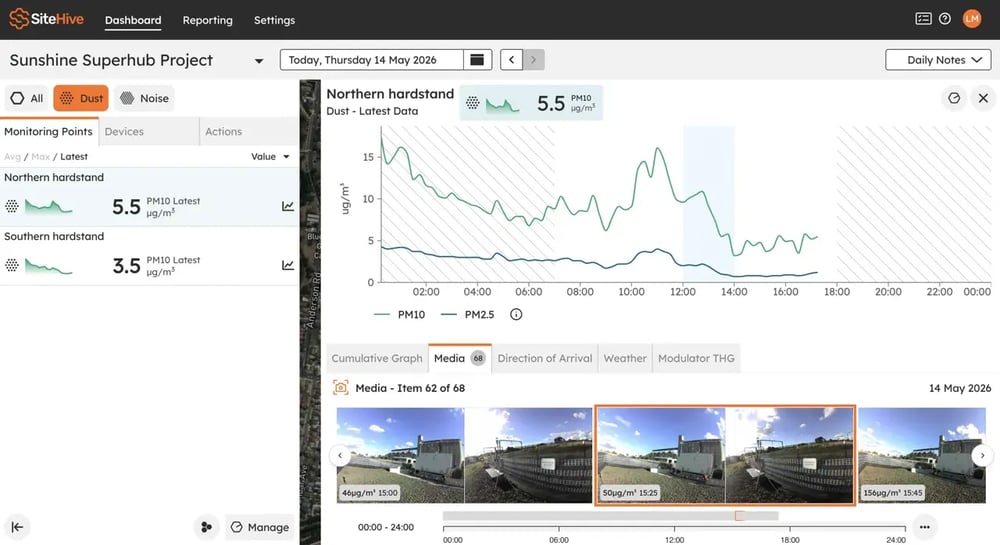
Triggered by the highest PM10 in the period. Captures two images, one in each direction.
Weather
Triggered by the highest wind gust in the period. Captures one directional image and one 6-second audio clip.
Noise+Dust
Triggered by the highest dB (LAmax) in the period. Captures one directional image and one 6-second audio clip.
Weather+Dust
Triggered by the highest PM10 in the period. Captures two images, one in each direction, and one 6-second audio clip.
Images are captured within 1 minute of the peak event. Audio clips contain the peak noise event within the 6-second recording.
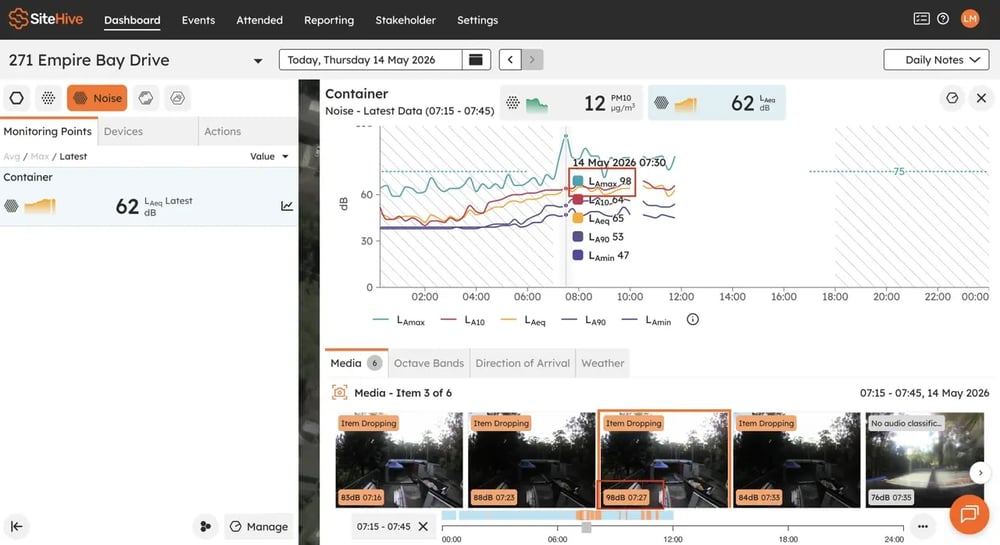
ℹ️ On Hexanodes with a noise aspect, the image is directional: the camera facing the identified source of the loudest sound is selected automatically.
What you'll see in the dashboard
Your media timeline is populated consistently through the day. Each media item is anchored to the 15-minute aggregation period it belongs to, so the image or audio lines up with the corresponding data point on your charts.
FAQs
Do I need to do anything to enable this?
No. Media capture is on automatically across all Hexanode devices, with no configuration required.
Will I see media for quiet periods?
If a period is genuinely calm (for example, a weather device recording 0 km/h wind for a full 15 minutes) no media is captured for that period. Otherwise, the timeline always has media.
Does this affect power or data usage?
The increase in media coverage is designed to stay within the device's existing power and connectivity constraints. Media is uploaded within 5 minutes of capture.
Is this available on both SiteHive Enviro and SiteHive Enviro Pro?
Yes. Media capture is available on both, with the same functionality.
What's next
Set up media triggers (capture extra media when a level you choose is exceeded)
Audio Classifier: what made the noise (a label on every audio clip, SiteHive Enviro Pro)
Dashboard overview (the media timeline and everything around it)